


AppClose: Co-Parent Essentials
4.31.94K Reviews
App Specs
- Version
- 3.4.7.8
- Updated On
- License
- Free
- Downloads
- 1,000,000+
- Developer
- AppClose, Inc
- Categories
- Parenting
- Platform
- Android, iOS
Screenshots
 Analysis by AppCompare
When parenting across two households, even small decisions can turn into a chain of messages: who is collecting the child, whether a school appointment has changed, and how to settle a shared cost. I look for tools that make those details easier to manage without asking either parent to trust a stream of scattered texts. AppClose: Co-Parent Essentials is a parenting app from AppClose, Inc. built around that practical problem. It is free to download, rated for Everyone, and has a 4.6 average from around 28,000 ratings, with more than a million installs. Those figures suggest it has found a broad audience, but they do not tell me whether it suits every family; the important question is how its communication and organization tools fit the way parents actually work together.
Trust starts with realistic expectations
Co-parenting involves information that can feel especially personal: schedules, conversations, expenses, and documents about a child. That makes it tempting to treat any app with a privacy-oriented pitch as automatically trustworthy. I would be more careful. A useful review should distinguish between what the app visibly lets people do and what cannot be established from using its interface alone. I can assess the practical controls and choices described here, but I would not treat an app as a substitute for checking its current privacy information or considering whether both households are comfortable using it.
That distinction matters most when parents are managing conflict. A shared record can make it easier to refer back to what was agreed, but it cannot make the other person respond promptly, interpret a message fairly, or follow a schedule. I see the app as a place to organize co-parenting work, not as a mediator, legal adviser, or guarantee that a disagreement will be resolved. That is a more grounded way to judge its value than expecting technology to fix the relationship around it.
Controls that shape everyday use
The most useful user choices are the ones that help keep routine details from being scattered. A shared calendar gives both parents a common place to check plans, while reminders can help make an upcoming event harder to overlook. Messaging keeps co-parenting conversations in a dedicated channel rather than mixed with work chats and family group threads. Expense tracking and document sharing extend that organization to practical matters that otherwise tend to live in separate notes, email attachments, or paper folders.
I would still set simple habits before relying on those tools. Agree on which parent enters a schedule change, how quickly the other should acknowledge it, and what counts as a confirmed plan. For expenses, decide what information to include when logging a cost so a request is understandable later. A receipt or short note can make a record more useful than an amount with no context. These are small choices, but they reduce ambiguity and help the app serve as a shared workspace rather than another place to argue over missing details.
One trade-off is that a shared system only works when both parents use it consistently. If one person keeps changing plans by text and the other expects the calendar to be authoritative, the app may add a second source of truth instead of removing confusion. I would agree on a transition rule: once a change is discussed, put the final arrangement in the shared calendar and use the conversation to explain it. That workflow makes it easier to distinguish a proposal from a settled plan.
Features That Make Life Easier
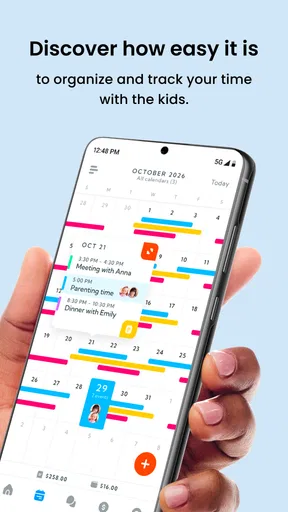
One of the standout aspects of AppClose is its comprehensive suite of tools designed to streamline communication and organization for co-parents. First off, the calendar feature is a lifesaver. It allows you to share schedules, set reminders, and even plan events without the back-and-forth of texts or calls. It's all there, in one place, and both parents have access to it. This really cuts down on miscommunications and double-bookings.
Worth Reading Before You Choose

EA SPORTS FC Mobile 26 Is a Bigger Football Game, but It Takes Time

Flipboard Shows What News Apps Must Do Beyond the Feed

Switching to Android Auto Means Rethinking Your Driving Routine

Google Calendar Makes a Crowded Week Easier to Manage

Ludo King Makes the Most of the Minutes Between Plans

Baby Panda World Brings Quick Play to Modern Phones, but Its Game Library Feels Busy
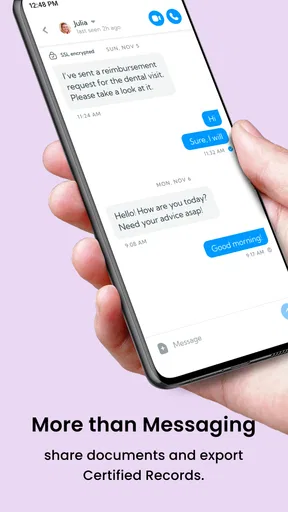
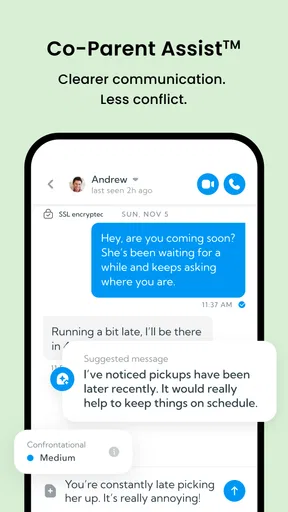
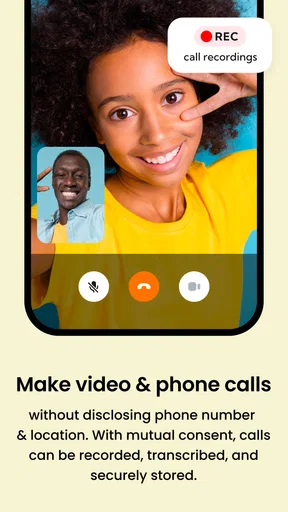
Then there's the messaging feature. It's not just your regular chat; it’s specifically designed for co-parenting. You can keep track of conversations and even set them up to be admissible in court if needed. This is particularly handy if things ever get complicated. Plus, the app keeps everything documented, which can be a real game-changer.
Making a shared record useful
A record is only as helpful as the way people use it. I would keep messages specific and calm: one subject per conversation where possible, a clear date or time when discussing a handoff, and a direct question when a decision is needed. That makes later review easier than searching through a long thread containing several unrelated topics. If an issue could have legal consequences, I would not assume that an in-app record is automatically admissible or sufficient; legal standards vary, so a qualified professional is the right person to ask.
The calendar can also do more than list custody transitions. It can be used to make the less dramatic parts of parenting visible to both households, such as a school event or an appointment that affects pickup plans. A practical approach is to enter the event as soon as it is known, then use messaging for any discussion about who will handle it. That separation keeps the calendar readable and the conversation available when a decision needs context.
Expense Tracking and More
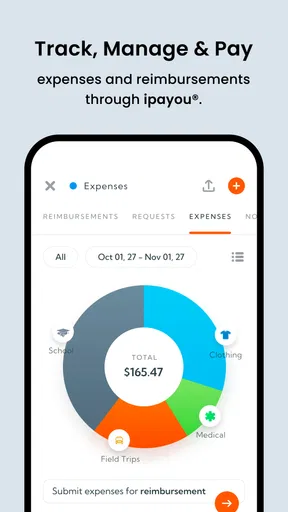
Managing finances is often a sticky point in co-parenting, but AppClose seems to have thought of everything. The expense tracking feature lets you log shared expenses and even request payments from the other parent. It's all about transparency and fairness, and honestly, it takes a load off your shoulders.
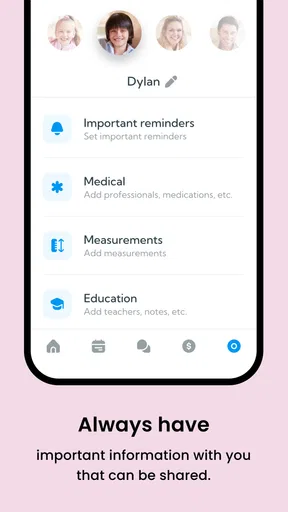
Additionally, the app includes a section for sharing important documents. Whether it’s medical records, school reports, or legal papers, you can keep everything organized and accessible. No more scrambling to find that one paper you need right now.
These tools are most valuable when they replace a known, recurring hassle. For example, if one parent pays for a child’s activity and the other is expected to contribute, logging the expense with enough detail can give both a reference point instead of relying on memory. But tracking does not settle whether a cost was agreed to or how it should be divided. I would discuss those expectations separately and keep the app record factual. The same restraint applies to documents: share only what is relevant to co-parenting, and think carefully before placing particularly sensitive paperwork in any shared digital space.
A realistic week, and where friction remains
Imagine a school pickup changing because an appointment runs late. One parent can send a focused message with the proposed adjustment, and once both agree, the calendar can show the revised plan. If the change affects a shared cost, that can be handled in the expense area rather than buried in the same chat. Later, either parent can look back at the schedule or conversation without searching through unrelated personal messages. That is a modest workflow, but it is exactly the kind of repeated coordination where a dedicated app can earn its place.
The same example shows the limitation: the app cannot make an unanswered message into an agreement. A parent who needs a quick confirmation should not assume that entering a change in a calendar means the other person has seen or accepted it. For urgent matters, use the communication method the family has agreed is appropriate, then update the shared record when the plan is settled. Digital organization helps preserve clarity; it does not remove the need for direct communication.
Compared with ordinary texting, a co-parenting app gives schedules, costs, and relevant conversations a more focused home. Compared with a general calendar or notes app, it brings several co-parenting tasks together rather than requiring parents to maintain separate tools. The trade-off is that both adults need to adopt the same system, and a dedicated space may feel unnecessary for parents who already cooperate smoothly using a shared calendar and straightforward messages. If only one household will use it, or if the family needs a formal process beyond everyday coordination, a different arrangement may be more suitable.
User Experience and Accessibility
When it comes to the user experience, AppClose doesn't disappoint. Its interface is intuitive and user-friendly, making it easy for anyone to navigate, even those who aren’t tech-savvy. The app is available on both Android and iOS, and the download is a breeze. Just a few taps, and you're ready to get started.
Version 3.4.7.0 supports Android 5.0 and later, so an older Android device may still meet the stated minimum requirement. The app is free, with in-app purchases ranging from $8.99 to $98.99 per item. I would check the purchase details in the app before committing to anything, especially if both parents expect to use the same set of tools. The basic cost of downloading it is not the only consideration if a household is deciding how much to spend on optional items.
Getting started is likely to be easiest when both parents agree on a narrow first use rather than trying to move every detail at once. They might begin with upcoming schedule changes, then add shared costs or documents only if those are genuine pain points. This gives each person time to learn where information belongs and makes it easier to spot whether the app is reducing confusion. If the other parent is reluctant, explaining the practical purpose—such as having one agreed place to check pickup times—may be more productive than presenting it as a way to monitor them.
Privacy, boundaries, and user agency
Security is another strong point. The app takes privacy seriously, ensuring that all your information stays secure. With so much sensitive information being shared, knowing that it’s protected is a huge relief.
Because co-parenting records can include sensitive material, I would avoid treating a general reassurance as a complete privacy assessment. Before uploading a document or using a conversation for a delicate subject, review the app’s current privacy and account information and consider what each parent can access. Keep account credentials private, use the controls available on your device, and avoid sharing more detail than the task requires. Those are sensible precautions for any shared parenting tool, not evidence of a particular data practice.
There is also a boundary question: documentation can support clarity, but using every feature to build a case against the other parent can make routine coordination feel more adversarial. I would use the calendar for plans, messages for decisions and context, expenses for costs that need tracking, and documents for records that genuinely need to be shared. Keeping each area purposeful makes it easier to find information and reduces the temptation to turn ordinary exchanges into a running dispute.
Who will get the most from it
I would recommend considering AppClose if two households repeatedly coordinate schedules, need a shared place for co-parenting messages, or find it hard to keep expense requests and child-related paperwork organized. It is particularly promising for parents who are willing to agree on a few basic habits and then use the same system consistently. Its strongest practical case is not that it changes co-parenting; it is that it can put several recurring tasks in one shared space.
I would skip it if both parents already manage plans clearly with tools they trust, if the other parent will not participate, or if adopting another app would create more tension than it removes. It may also be the wrong fit for someone looking for professional mediation, legal guidance, or a guarantee that shared records will have a particular outcome in court. The app can help people organize their side of co-parenting, but it cannot replace agreement, judgment, or appropriate outside advice.
Final Thoughts
In the world of co-parenting, where coordination and communication are key, AppClose: Co-Parent Essentials stands out as a valuable tool. It’s packed with features that address the everyday challenges of co-parenting, from scheduling to communication to handling expenses. If you're navigating the co-parenting journey, this app might just become your new best friend.
Ready to give it a try? You can download it directly from the Google Play Store or the App Store and see for yourself how it can transform your co-parenting experience. Trust me, it's worth checking out!
Pros
- User-friendly interface for easy navigation.
- Comprehensive co-parenting tools included.
- Secure and private communication options.
- Customizable scheduling features.
- Expense tracking to manage shared costs.
Cons
- Limited customer support availability.
- Some features require in-app purchases.
- Occasional sync issues with calendars.
- Notifications can be inconsistent.
- Lacks integration with other family apps.
FAQs for AppClose: Co-Parent Essentials
What is AppClose and how does it benefit co-parents?
AppClose is a comprehensive app designed to assist co-parents in managing and organizing their shared parenting responsibilities. It offers features such as a shared calendar, expense management, and secure messaging. This app helps reduce misunderstandings and improves communication, ultimately benefiting both parents and children by promoting a harmonious co-parenting relationship.
Is AppClose free to use, or are there any in-app purchases?
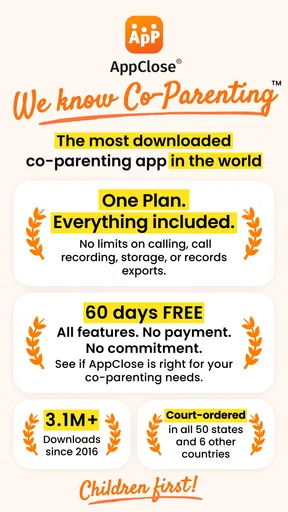
AppClose is free to download and use, offering a wide range of essential features without any subscription fees. However, there are optional in-app purchases for enhanced functionalities, such as additional storage or advanced tools. These purchases are entirely optional and not necessary to benefit from the core features of the app.
How secure is the data shared on AppClose?
AppClose prioritizes user privacy and data security. The app utilizes encryption and secure servers to protect all information, ensuring that sensitive data such as financial details and personal messages remain confidential. Users can feel confident that their shared information is secure and accessible only to authorized parties.
Can AppClose be used for other family management needs?
Yes, AppClose is versatile and can be used beyond co-parenting. Families can use it to organize schedules, manage expenses, and communicate effectively. The app’s features are adaptable, making it a valuable tool for any family configuration looking to streamline their daily operations and improve coordination.
Is AppClose available on both Android and iOS platforms?
AppClose is available for both Android and iOS devices, ensuring accessibility for a wide range of users. The app can be downloaded from the Google Play Store for Android users and the Apple App Store for iOS users, allowing seamless integration across different devices and platforms.


